
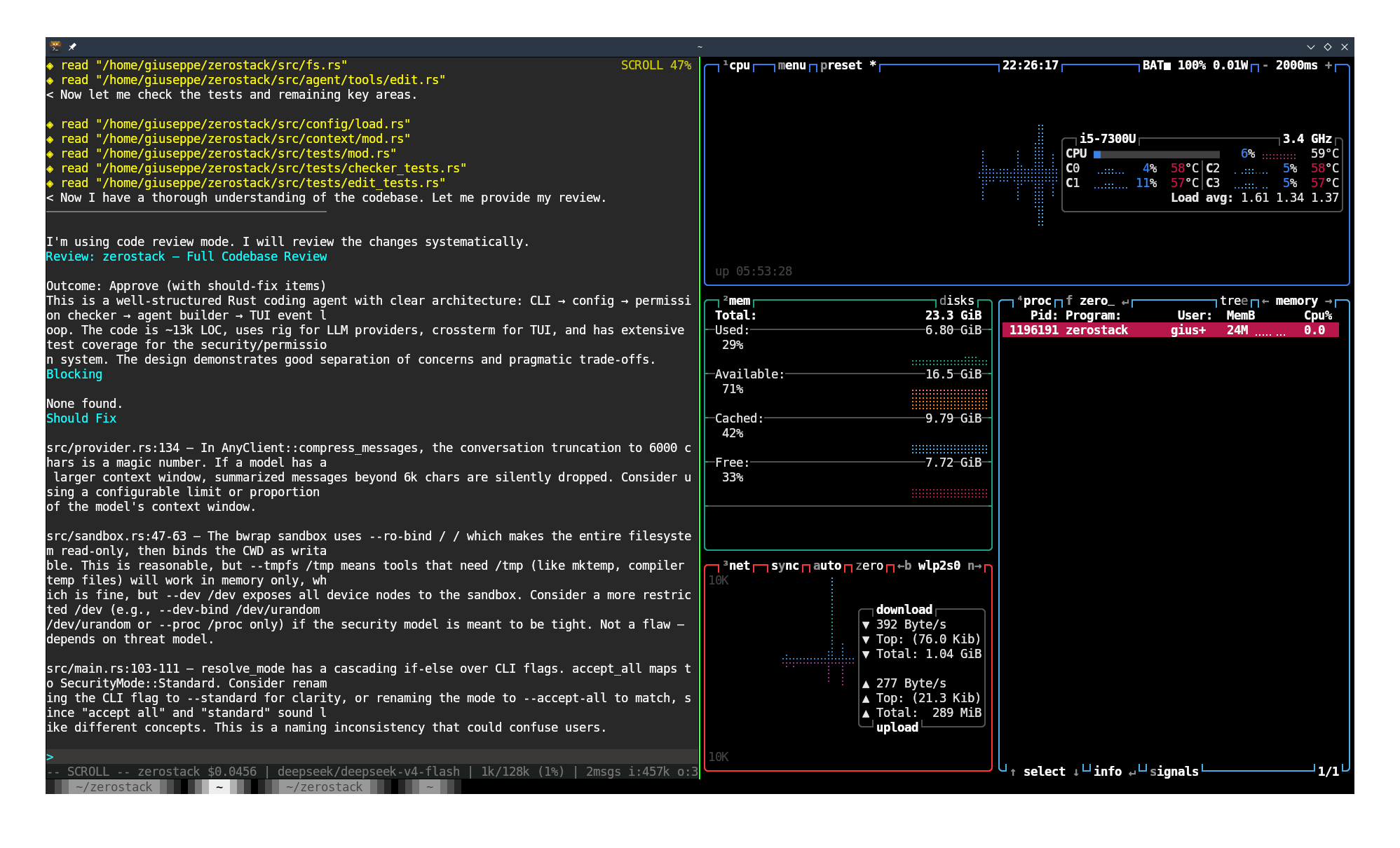
~30k
Lines of Code
26MB
Binary Size
~16 MB
RAM (avg)
0.0%
CPU (idle)
Section 1
1.Overview
- Multi-provider — OpenRouter, OpenAI, Anthropic, Gemini, Ollama, plus custom providers
- Standard tools — all tools exposed to coding agents (as described by opencode)
- Permission system — 5 modes, per-tool patterns, session allowlists
- Terminal UI — crossterm, markdown rendering, mouse support, scrollback
- Prompts system — 14 built-in prompts, switchable at runtime
- Session management — save/load/resume, auto-compaction
- MCP support — connect external tool servers
- Ralph Wiggum loops — iterative coding for long-horizon tasks
- Git Worktrees — branch-per-task workflow
- ACP support (gated) — editor integration (Zed, etc.)
- Persistent memory (gated) — plain-Markdown memory across sessions
- Lifecycle hooks (gated) — observe/gate tool calls and session lifecycle via external commands
- Advisor (gated) — consult a second model mid-session for strategic guidance
- Multimodal input (gated) — attach images and PDFs to messages
- Subagents — parallel, fast codebase exploration
- ARCHITECTURE.md — shared core knowledge for all agents on the same codebase
- Sandbox mode — bubblewrap / zerobox isolation
- Exa search — WebFetch & WebSearch tools
- Prompt chaining — offers to advance brainstorm → plan → code → review
- Status signals — run-state and permission-wait events over a Unix socket (docs/STATUS_SIGNALS.md)
Section 2
2.Prompts
Built-in system prompts that change the agent's behavior and tone — switch at runtime with /prompt:
| Prompt | Description |
|---|---|
code | Coding mode with full file & bash access, TDD workflow |
plan | Planning-only — explores and produces a plan without code |
review | Code review for correctness, design, testing, and impact |
debug | Finds root cause before proposing fixes |
ask | Read-only mode — no writes or bash |
brainstorm | Design-only — explores ideas without code |
frontend-design | Distinctive, production-grade UI |
review-security | Finds exploitable vulnerabilities |
simplify | Refines for clarity without behavior change |
write-prompt | Creates and optimizes agent prompts |
Custom prompts can be created by placing markdown files in $XDG_CONFIG_HOME/zerostack/prompts/.
Section 3
3.Permissions
| Mode | CLI | Behavior |
|---|---|---|
| restrictive | -R | Ask for every operation |
| readonly | --read-only | Read/grep/list only. Deny writes, edits, bash |
| guarded | --guarded | Allow reads. Ask for writes, edits, bash |
| standard | (default) | Allow path tools within CWD. Safe bash auto-allowed |
| yolo | --yolo | Allow everything, prompt for destructive commands |
Per-tool granular glob patterns, session allowlists, and doom-loop detection prevent runaway agents. The --dangerously-skip-permissions flag bypasses all checks.
Section 4
4.Commands
/model — Switch model
/thinking — Set thinking level
/clear — Clear conversation
/session — List/save/load sessions
/loop — Schedule recurring prompts
/prompt — List or change system prompt
/mode — Set permission mode
/worktree — Create git worktree and move into it
/wt-merge — Merge worktree branch, clean up, return (no push)
/wt-exit — Return to main repo without merging
/queue — Manage input queued while the agent is busy
/btw — Ask a quick side question in parallel
/review — Run a one-shot code review
/hooks (gated) — Show the installed hook dispatcher config
/advisor (gated) — Show or change advisor status
/help — Show all commands
Section 5
5.Documentation
- GET_STARTED.md — Installation, first session, and essential commands
- ARCHITECTURE.md — Project architecture and design decisions
- COMMANDS.md — Slash commands reference
- CONFIG.md — Full configuration guide (TOML/YAML)
- HASHEDIT.md — Hashedit edit system reference
- MEMORY.md — Persistent memory across sessions
- PROVIDERS.md — Provider setup and API keys
- SUBAGENTS.md — Parallel subagent delegation
Section 6
6.Quick Start
# Set your API key (OpenRouter is default)
export OPENROUTER_API_KEY="[api_key]"

# Interactive session (default prompt: code)
zerostack

# Monochrome TUI
zerostack --no-color

# One-shot mode
zerostack -p "Explain this project"

# Continue last session
zerostack -c

# Explicit provider/model
zerostack --provider openrouter --model deepseek/deepseek-v4-flash
Section 7